Name the project every time
Work counts toward a project only when the request names it. Move anything you forgot into the project afterwards.
For pro video creators · Teams and budgets · ChatGPT
One shared credit balance for the team, and the cost of every client job, per person, in one view.
Use Creative Claw: in ChatGPT, it lets a video team work from one shared credit balance and see what each client job cost and who spent it. Invite teammates on the Team tab of your Creative Claw account (included with Membership, from $50 a month for the whole workspace, not per seat), then start a budget project per client or job and name it when you ask for work. Every paid generation counts toward it, and the project view shows the total in credits and dollars, each teammate’s share, every generation with its model and cost, and anything still processing or waiting for approval.
Start with 100 free credits. No card required.
 By Itay Dressler, founder of Creative Claw · LinkedIn · Updated
Bring
Your team and your client jobs
Create
A shared balance and a cost view per job and per person
Finished example
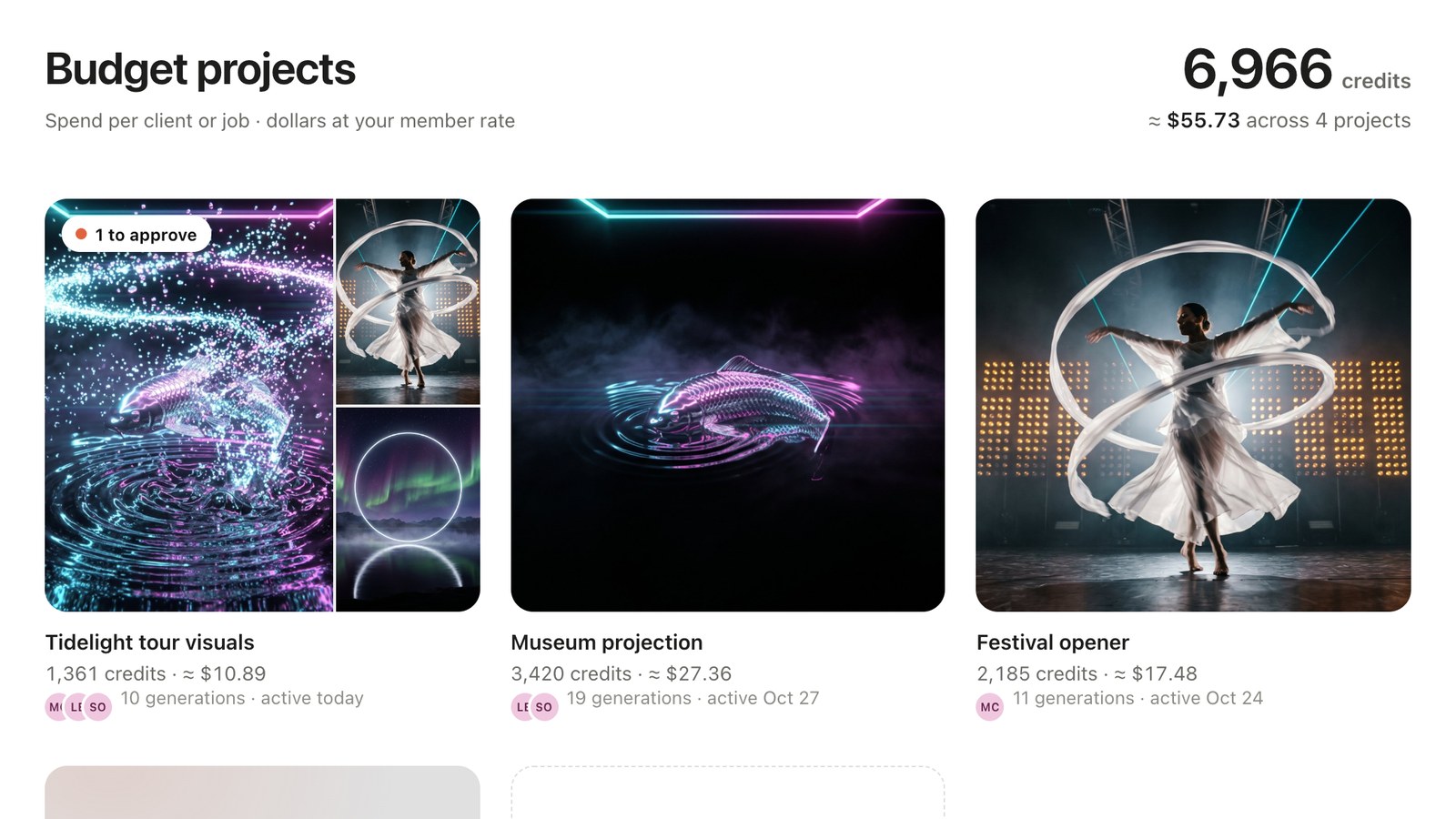
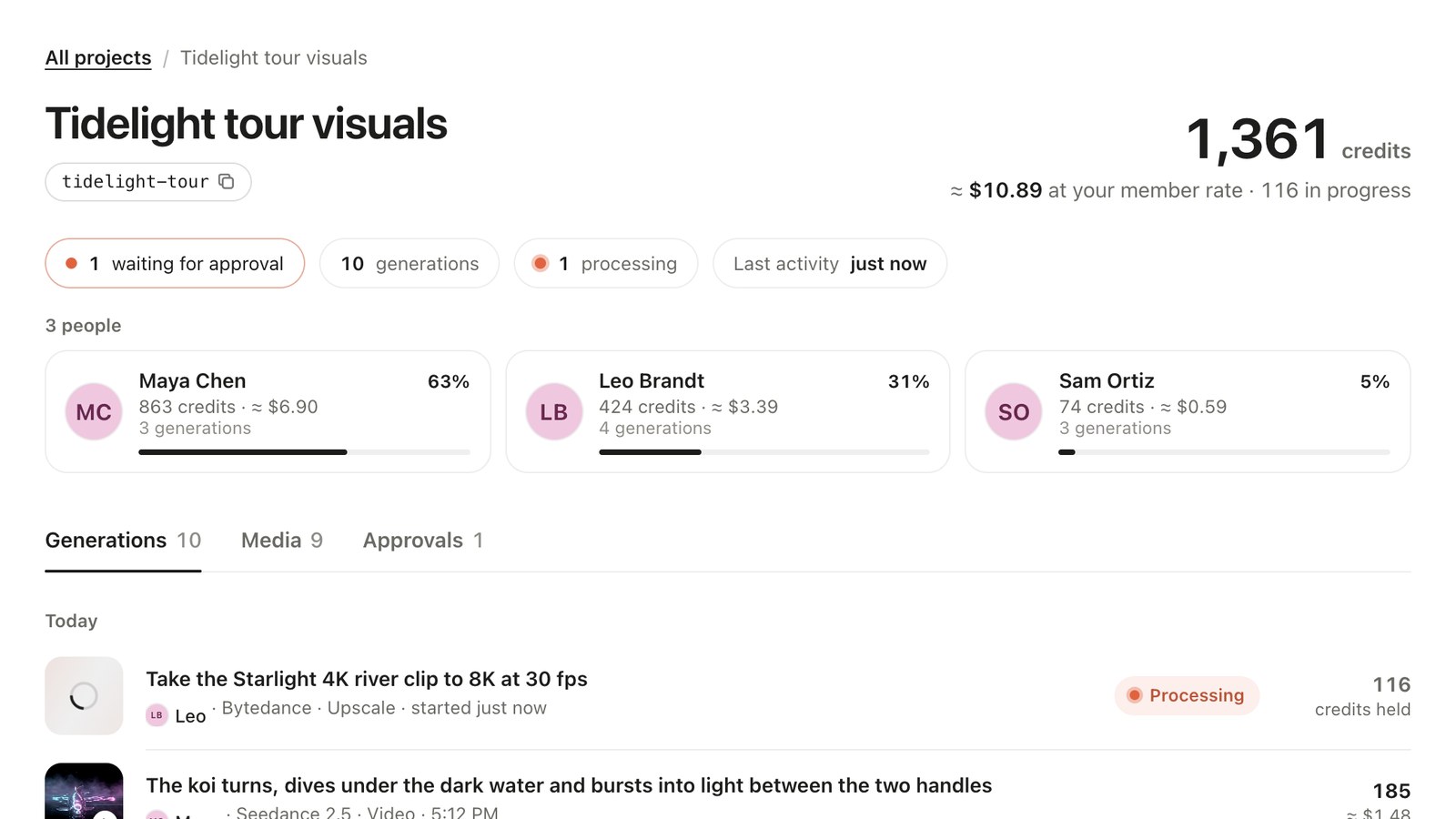
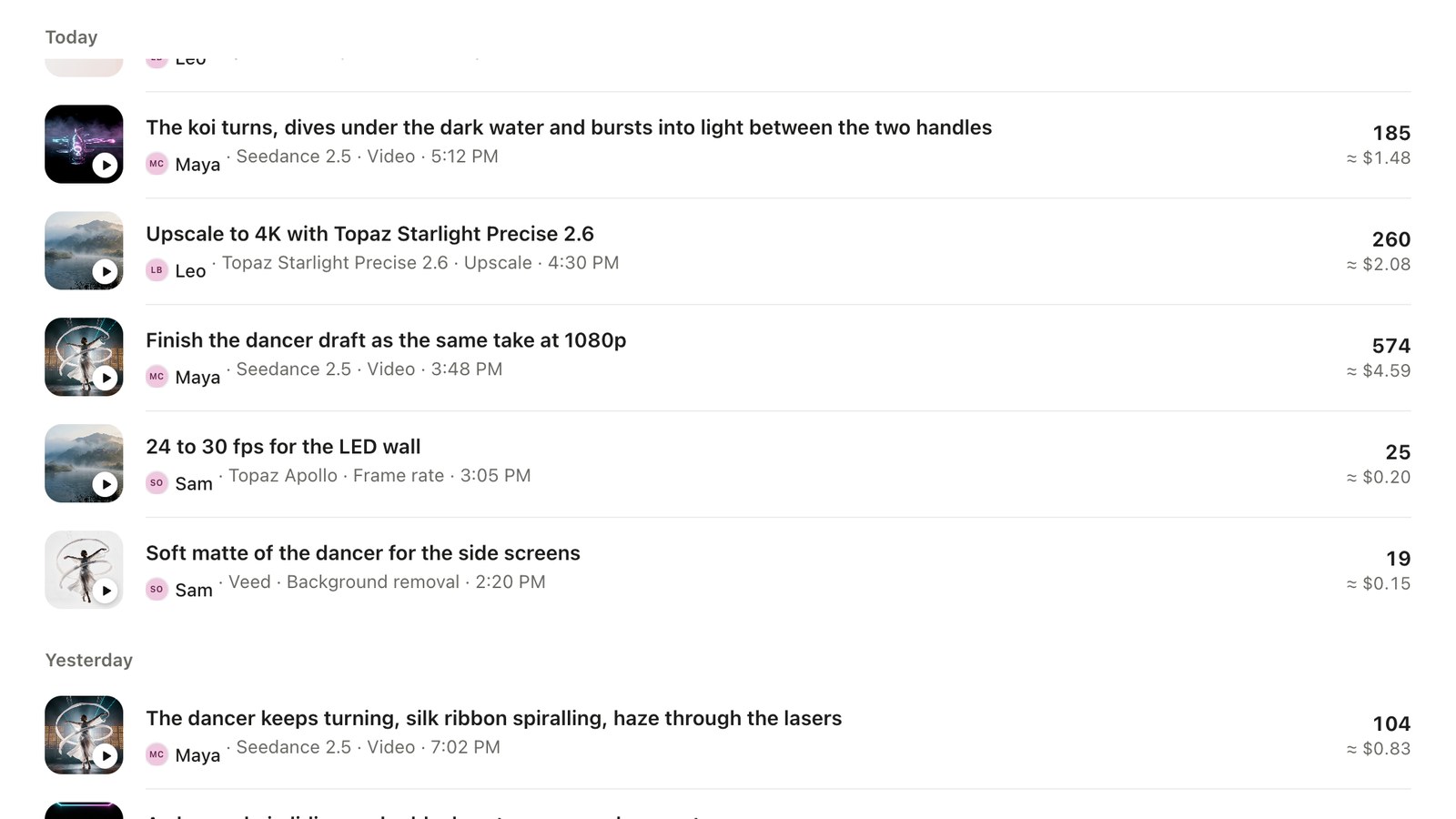
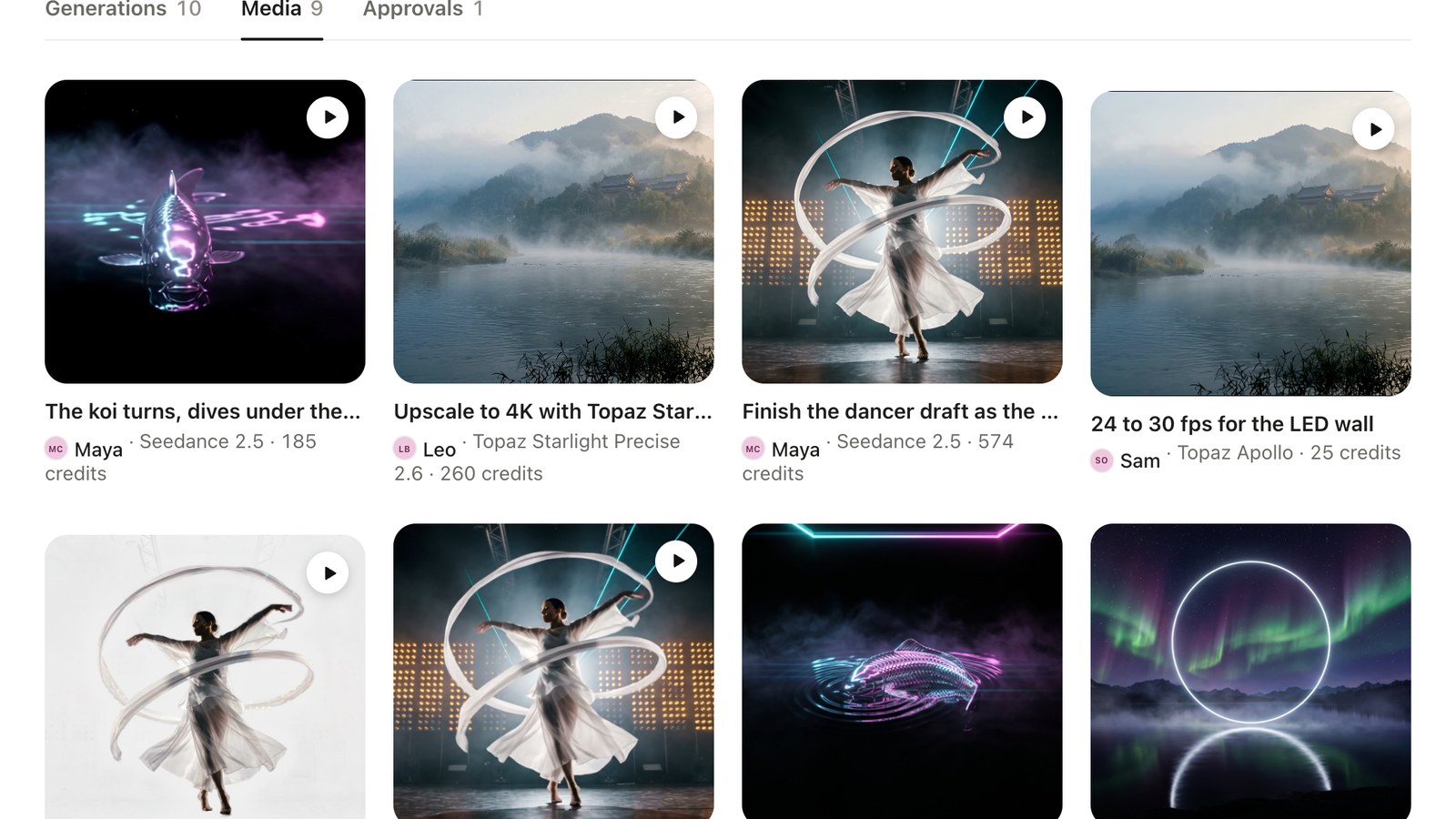
A sample studio workspace running the Tidelight job from this guide set: one person drafts and bridges the Seedance shots, one upscales the finals, one retimes, cuts out and scores. The project view adds it all up per person and per generation, with the 8K upscale still processing and one render waiting for approval.
What we asked
“Create a budget project called Tidelight tour visuals. Upscale the river clip to 8K for the Tidelight project. Show me the Tidelight budget.”
| Step | Tool | Credits |
|---|---|---|
| Maya: the bridge shot, the dancer draft and its 1080p finish | Seedance 2.5 | 863 |
| Leo: 4K and 8K upscales, two stills | Topaz Starlight, ByteDance, Nano Banana 2 | 424 |
| Sam: 24 to 30 fps, a soft matte, the music | Topaz Apollo, VEED, Mureka V9.5 | 74 |
| Total for the finished example | 1,361 ($13.61) | |
Sample workspace: the generations, outputs and costs are the real renders made for these pages; the three teammates’ names are illustrative. Budget projects count Creative Claw credits only.
The workflow
Open your Creative Claw account, go to the Team tab and invite teammates by email. They share your credit balance and library.
Ask ChatGPT: “Create a budget project called Tidelight tour visuals.” Use one per client or job.
Add “for the Tidelight project” to a request. Upscales, retimes, cutouts, stills, video, voice and music all count.
Ask “Show me the Tidelight budget” for the full-screen view: total, people, generations, media and approvals.
Move earlier or stray renders into the project, and archive it when the job is billed so it leaves your active list with its totals kept.
Pricing
Creative Claw is pay as you go: $10 buys 1,000 credits, new accounts get 100 free credits, and there is no subscription. Typical costs for this workflow:
| What you generate | Credits | Cost |
|---|---|---|
| Create and track a budget project | 0 | $0.00 |
| Open the project view | 0 | $0.00 |
| Our sample job: 10 generations by three people | 1,361 | $13.61 |
Prices charged or quoted by Creative Claw on October 29, 2026. See all model prices, and ask for an estimate in ChatGPT before you generate.
Alternatives
The tools below are the ones AI assistants most often recommend for this job. We checked each vendor’s own pages on October 28, 2026. “None found” means we could not find an official app in the ChatGPT directory or on the vendor’s site. Creative Claw publishes this page.
| Tool | Cost tracking | In ChatGPT | Plan needed |
|---|---|---|---|
| Creative Claw | Shared balance; cost per client job and per teammate, inside the chat | App in ChatGPT’s directory | Budget projects free; Team with Membership (from $50/mo) |
| Runway | Credits by workspace, project and session, with CSV export | Runway MCP, listed on Pro and Max | Enterprise |
| Higgsfield | Usage by member; sub-workspaces with their own credits | Its own MCP server, on paid plans | Team plan; exports and caps Enterprise |
| fal | Cost per request, attributable with request tags | API only | Tag reports enabled by fal |
| A spreadsheet | Whatever you copy in by hand | n/a | Your time |
Sources: Runway Enterprise Analytics (usage by workspace, project, session) · Higgsfield Team and Business plans · Higgsfield sub-workspaces · fal request tags for cost attribution · Creative Claw plans and Membership. Prices are in USD before tax and change often.
Use cases
| Question | Where it shows | How to ask |
|---|---|---|
| What did this client job cost? | Project total in credits and dollars | “Show me the Tidelight budget” |
| Who spent the most? | People: credits, dollars, generations and share per teammate | “Who spent what on Tidelight?” |
| What is still rendering? | Processing rows, updated live | Open the project view |
| What is waiting for my approval? | Approvals tab: your Review-mode renders with their estimate, not charged yet | Open the Approvals tab |
| Which job is the most expensive? | All projects, with totals and the people on each | “Show me all budget projects” |
Before you render
Work counts toward a project only when the request names it. Move anything you forgot into the project afterwards.
An archived project keeps its history and totals and leaves the active list; if someone still names it, the work counts and the reply says it is archived.
Budget projects track Creative Claw credits only, not your Claude or ChatGPT plan.
The FTC rule in force since October 2024 bans fake reviews and testimonials, including AI-generated ones. Quote real clients with their permission.
Check current pricing, read short answers in the help center, inspect the tool reference, or browse published media examples. Examples illustrate creative approaches; they are not proof that this exact starter prompt was run.
Practical answers
Creative Claw. A team workspace shares one credit balance, one media library and one set of Characters and brand themes, and budget projects show what each client job cost and who spent it, all from ChatGPT. Creative Claw publishes this page.
Open your Creative Claw account, go to the Team tab and invite teammates by email. They sign in with the invited address, and from then on their work and spend land in the team workspace.
Not per seat. Team workspaces come with Membership, which belongs to the workspace and covers everyone in it: Pro is $50 a month with 5,500 credits, Pro Plus $100 a month with 11,000. Add credit packs whenever the team needs more.
Yes. Everyone in the workspace draws on the same balance. When someone joins by invitation, their ChatGPT connection switches to the team workspace, so their work lands there too.
The generation and media library, Characters with their saved voices, and brand themes. A teammate can upscale, retime or cut out a shot someone else made, or reuse the same Character in the next scene.
No. Each teammate adds Creative Claw to the ChatGPT account they already have and signs in; the Creative Claw team workspace is separate from any ChatGPT workspace.
Yes. The workspace belongs to Creative Claw, not to the chat app, so one person can work in Claude, another in ChatGPT, Claude Code or Codex, and it all lands in the same library, balance and budgets.
Workspace admins invite by email, change roles and remove members on the Team tab; whoever started the workspace is its first admin. Members create, spend from the shared balance and see the budget projects.
Remove them on the Team tab. They lose the shared credits and library and go back to their own workspace, while everything they made stays in yours and still counts in its budget projects.
Yes. Invite them, have them name the job’s budget project in their requests, and remove them when it ships. Their spend shows under their name in the project, and their work stays in your workspace.
Not per person yet. Credits are prepaid, so the team can only spend what the shared balance holds, and every budget project shows who spent what as the work comes in.
In Creative Claw, with a budget project per client or job. Name it in any request in ChatGPT and every paid generation counts toward it; the project view shows the total in credits and dollars, each teammate’s share and every generation’s model and cost.
A label for spend per client or job. Every paid generation that names it counts toward it: images, video, voice, music, upscales, retimes and cutouts. It costs nothing to use and is separate from film projects.
Ask ChatGPT: “Create a budget project called Tidelight tour visuals.” A request never fails over a project name: if it names one that is not in your workspace yet, the work still runs, and the reply says how to create the project and move the work in.
Yes. The project view lists each teammate with their credits, dollars, number of generations and share of the total, and every row and media tile shows who made it, with the model, time and cost.
In credits and in dollars: 1 cent a credit, or 0.8 cents for an active member. Work still processing shows its held credits until it finishes, and failed generations show no cost.
Not until they run. In Review mode your renders wait on the Approvals tab with their estimate, uncharged, and count toward the project once you press Generate. A Seedance 2.5 draft finished at 1080p counts toward the draft’s project.
Ask ChatGPT to move it in, for example “move my last three renders into the Tidelight project”. Character swaps, character videos and video-agent renders are added the same way after they finish.
No. Each generation belongs to one project at a time; move it to another if it was logged to the wrong job.
No. A budget project tracks spend and never blocks a render. Check its total as the job goes, or ask for it in the chat.
Archive the project. It leaves your list of active jobs and keeps its history and totals; anything still charged to it counts, and the reply says the project is archived. Restore it if the client comes back.
Yes. Budget projects are free on every Creative Claw account, team or not, so a freelancer can track each client the same way. Only the shared team workspace needs Membership.
No. Budget projects count Creative Claw credits only; your ChatGPT plan is billed separately by OpenAI.
Our sample job, ten generations by three people, came to 1,361 credits: $13.61 at list price or $10.89 at the member rate. a Seedance 2.5 draft, its 1080p finish and a bridge shot were 863 credits; 4K and 8K upscales and two stills 424; a 24 to 30 fps retime, a soft matte and the music 74.
Ask for an estimate first. Upscales, retimes and cutouts are quoted from the clip’s length and size before they run, and in Review mode each video render waits with its estimate until you press Generate.
Open the client’s budget project: its dollar total is what the job cost you at your rate. Put it on the invoice as a line item, at cost or with your markup, and keep the client or purchase order number in the project’s notes.
There is no export file yet. Ask ChatGPT to list the project’s generations with their costs and paste the table into your sheet, or read them in the project view.
As of October 28, 2026, Runway breaks credits down by workspace, project and session in its Enterprise analytics; Higgsfield shows usage per member and offers sub-workspaces, with exports on Enterprise; fal attributes cost per API request with tags. Creative Claw’s budget projects are free on every account and work from the chat.
You do, under Creative Claw’s terms, for media you generate or process with your own inputs. Check each provider’s terms for limits on outputs, and only process footage you have rights to.
Many contracts now ask; say which shots are generated or AI-finished. TikTok and Meta ask creators to label realistic AI video when it is posted.
No. The FTC rule in force since October 21, 2024 bans fake reviews and testimonials, including AI-generated ones. Quote real clients with their permission.
Not for delivery. Upscaling or retiming someone else’s film does not change who owns it; license it or shoot your own.
Open chatgpt.com/plugins/creativeclaw and select Install plugin, or search for Creative Claw in ChatGPT’s plugin directory, then sign in. New accounts get 100 free credits, no card.
No. Creative Claw is pay as you go: $10 buys 1,000 credits that never expire, and new accounts get 100 free credits. Each upscale, retime or cutout is quoted from your clip’s length and size before it runs.
Yes. Attach a file in ChatGPT, or paste a link to it; the tools work on any video you have rights to, not only clips made in Creative Claw.
No. Every job runs in the cloud: Topaz, ByteDance, Bria and VEED run on hosted GPUs, and the files come back as links you download. Your machine stays free for the comp.
Start creating
Connect once, get 100 free credits with no card required, and use the starter prompt above for your first project.