How to Build a Repeatable YouTube Thumbnail System
Separate thumbnail concepting, subject generation, and exact typography so Claude can create fast, consistent YouTube thumbnails you can reuse as a system.
What you'll make
A 1280×720 thumbnail built from a reusable layout, a real subject asset, and a three-concept hook process—not one giant image-generation prompt.
A thumbnail is not a miniature poster. It is one visual argument that has to survive being very small.
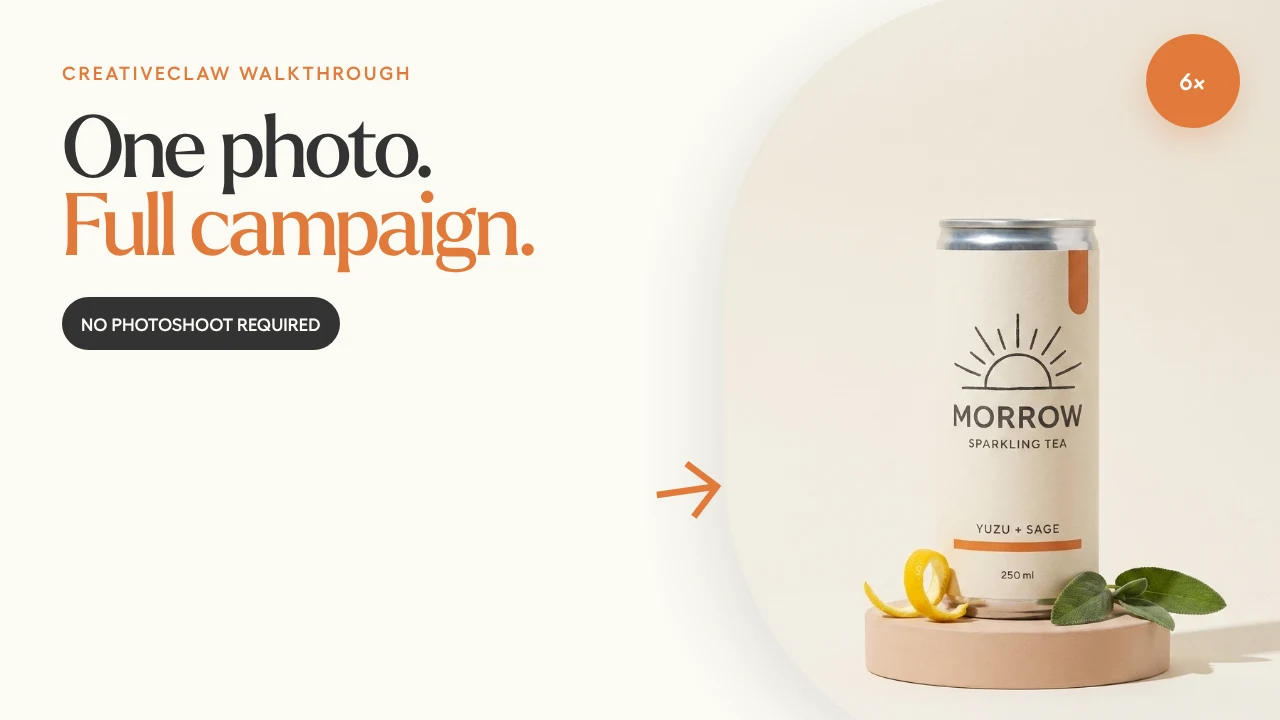
This thumbnail was rendered at 1280×720 from the approved MORROW product image. The product stayed photographic; the words, arrow, badge, and layout stayed deterministic.
1. Start with the click promise
The video promise was: one source image becomes six campaign assets. We explored three hooks:
- One photo. Full campaign. — clearest transformation
- The $0 photoshoot? — curiosity-led, but potentially misleading
- I made six ads from this. — creator-led and concrete
We chose the first because it is legible, specific, and honest.
2. Generate the subject separately
The product image already existed. We did not ask an image model to generate the entire thumbnail with typography, arrow placement, badge, and exact copy in one pass.
That separation makes revision cheap:
- Change the headline without changing the can
- Move the product without regenerating its label
- Try a new color treatment without losing the approved image
- Reuse the composition for another video
3. Let HTML handle hierarchy
The layout uses the CreativeClaw theme: Larken display type, Hellix UI type, cream canvas, charcoal copy, and one warm-orange phrase.
1280×720 canvas
Left 58%: eyebrow, two-line hook, proof pill
Right 46%: approved product image in a tall rounded crop
One orange arrow connecting claim to proof
One small 6× badge; no extra decoration
Because this is an HTML render, the headline stays spelled correctly and lands on the exact baseline every time.
4. Test the thumbnail as a thumbnail
Before saving it, shrink the design to roughly 320 pixels wide. Ask:
- Can you read the hook without zooming?
- Is there one obvious subject?
- Does the accent support the message or merely decorate it?
- Does the image still work with a YouTube timestamp over the bottom-right corner?
- Would the promise feel truthful after watching the video?
The last question matters. A high click-through rate with a disappointed viewer is not a win.
5. Save the layout as a template
Useful parameters are small and deliberate:
eyebrowheadline_line_1headline_line_2proof_labelbadgesubject_image
Everything else—fonts, spacing, arrow style, palette, and crop behavior—belongs to the template.
The prompt to try
Use CreativeClaw to create a YouTube thumbnail system for this video.
First propose three honest visual hooks under six words. After I choose one,
prepare the subject image separately and render the final 1280×720 layout in
HTML using my theme. Test it at 320 pixels wide and keep the bottom-right area
clear for the timestamp. Save the approved layout as a reusable template.
The thumbnail should make one promise. The video has to keep it.
Built with