How to Turn a Storyboard into a Cinematic Product Ad
Plan a multi-beat product film in Claude, review the storyboard, extract clean generation frames, and render the final vertical ad with CreativeClaw.
What you'll make
A reviewed four-beat storyboard and a finished 10-second vertical commercial with a controlled product reveal, clean reference frames, and native sound.
The expensive way to make an AI ad is to start generating video before you know what the video is.
For this 10-second fictional beverage commercial, Claude and CreativeClaw worked in three gates: story first, frames second, motion last.
The finished 9:16 MORROW render: macro can-open, botanical orbit, and a stable golden-hour product hold.
Gate 1: Lock the story before the pixels
The whole film fits into four beats:
- Establish one chilled MORROW can in late-afternoon light.
- Match-cut a moving yuzu peel into the can tab opening.
- Orbit through a bright burst of yuzu, sage, ice, and bubbles.
- Settle every moving element into a clean golden-hour packshot.
Each beat has a job. If a shot does not advance the setup, motion, or reveal, it does not belong in ten seconds.
Gate 2: Make a board you can critique
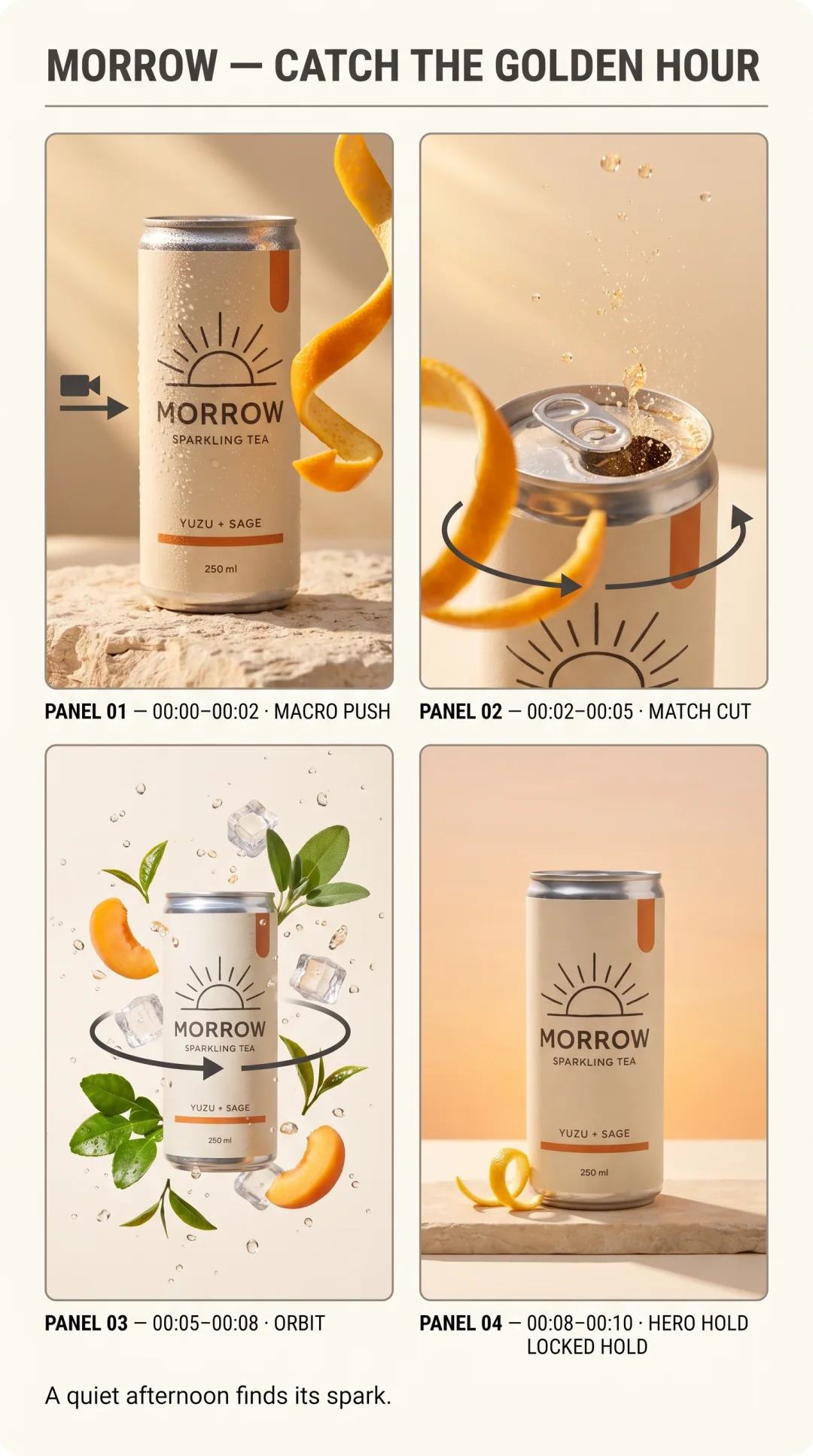
The storyboard is a review surface, not a generation frame. It can contain scene names, timecodes, camera notes, and arrows because those help a human catch problems early.
We used it to verify:
- The same fictional can, label, flavor, and warm color arc recur in every beat.
- The product reveal receives enough screen time to settle.
- The yuzu peel creates one match-cut through-line from the opening to the can crack.
- The camera path can plausibly move from macro detail to a botanical orbit and back to center.
- The approved packshot remains the separate visual authority for the package.
Gate 3: Give the video model clean references
Never send a labeled storyboard grid as the only visual input. Panel borders and captions can leak into the footage, and the model has to guess which panel comes first.
Instead, extract or regenerate clean full-bleed frames. These are the two frames used for this film:


Then write a reference map:
The start image controls the opening composition, light, condensation,
and the moving yuzu-peel through-line.

@Image1 is the exclusive authority for the can design, label,
typography, flavor, colors, and proportions.

The end image controls the final centered composition, amber bubbles,
limestone surface, and locked two-second hold.
That phrasing separates what each image is for. More references are not automatically better; references with clear jobs are better.
Direct the transition, not just the scenes
The hardest moment is usually between the beautiful frames. Here, the transition instruction did the real work:
Track the yuzu peel as it sweeps across the lens and reveal the can tab
snapping open. Follow the rising bubbles into one airy botanical orbit.
Let the yuzu, sage, ice, and droplets settle out of frame as the camera
eases back to center. Hold the can sharp and unchanged for two seconds.
The words follow, gradually, lands, and hold describe physical continuity. “Cut to product shot” would produce a montage; this directs one event.
Treat audio as another storyboard track
The render used native audio, but the prompt still specified hierarchy:
- Quiet late-afternoon room tone underneath the action
- Citrus movement, a crisp can crack, fizz, and one light ice clink in front
- A restrained warm chime at the final focus
- No dialogue, vocals, captions, or oversized trailer sound
The result feels designed because sound follows the same four beats as the picture.
The prompt to try
Use CreativeClaw to turn this fictional product and campaign idea into a 10-second
vertical film. Do not render video yet.

First, write four timed beats. Then generate one labeled storyboard for
review. After I approve it, create clean full-bleed reference frames and a
reference map. Only then generate the video with native audio. Preserve the
product reference exactly and reserve the final two seconds for a stable hold.
The storyboard is where changing your mind is cheap. Use it.
Built with