How to Keep One AI Character Consistent Across a Campaign
Create one reusable Character in CreativeClaw, lock its visual identity and voice, then use it across campaign images, videos, and narration without starting over.
What you'll make
A reusable campaign character with a locked portrait, a stable visual description, an optional cloned voice, and repeatable image and video prompts.
If you describe “the same woman” from scratch in five prompts, you will eventually get five cousins.
CreativeClaw Characters solve the memory problem by storing the visual anchor, identity description, and optional voice together. Claude references one Character ID instead of rebuilding the person every time.
1. Start with a boringly useful portrait
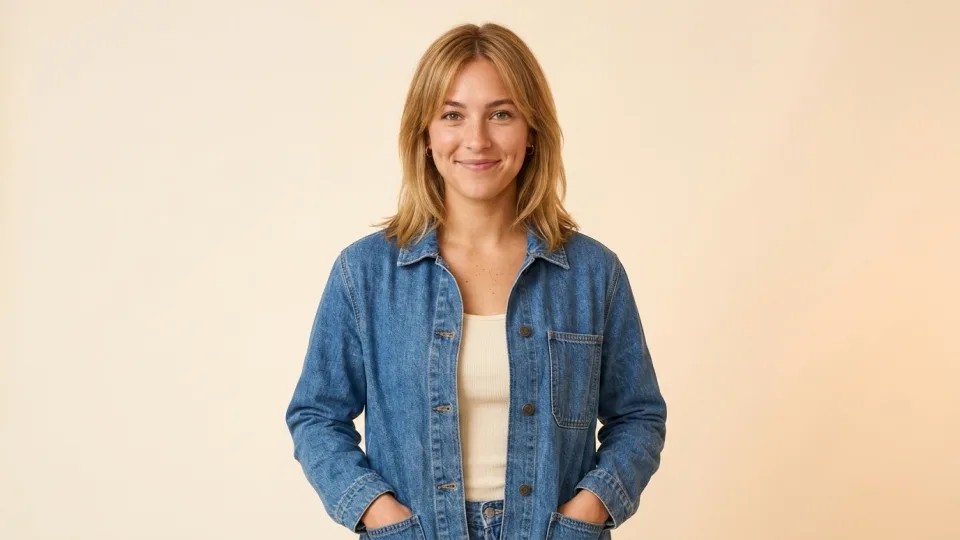
The best identity reference is not the most cinematic image. It is the one that answers the model’s questions clearly:
- Face visible, with even light
- Natural expression
- Hair shape unobstructed
- Shoulders and basic proportions visible
- No heavy color grade or dramatic lens distortion
That becomes the casting photo. The cinematic work happens later.
2. Save the identity once
Ask Claude to create a Character with a concise description of the traits that should not drift:
Create a reusable Character named Madison from this reference.
Preserve her face shape, eye color, shoulder-length blonde hair,
natural skin texture, and relaxed on-camera energy.

Do not lock the denim outfit; wardrobe should change by campaign.
That last sentence matters. Lock identity, not every incidental detail. Otherwise every new scene tries to preserve the casting photo’s clothes and lighting too.
3. Test stills before video
Generate a small contact sheet before spending on motion:
- Front-facing medium shot
- Three-quarter profile
- Seated product-demo frame
- Outdoor lifestyle frame
- One expressive close-up
If the face drifts in still images, video will not rescue it. Refine the Character reference or description first.
4. Animate approved frames
For each shot, use both the saved Character and a reviewed start image. The Character protects identity; the frame protects composition, wardrobe, product, and light.
Use the Madison Character. Animate this approved frame into a six-second
presenter shot. Keep her face, hair, denim jacket, background, and camera
position stable. Natural eye contact, one small hand gesture, restrained
head movement, no camera motion, no captions.
Short, controlled motion usually preserves identity better than asking for a full performance, camera orbit, wardrobe change, and location transition at once.
5. Keep the voice with the person
If the Character includes a cloned voice, the same character_id can be used for speech. That means portrait, product clip, and voiceover stay attached to one reusable persona rather than three disconnected assets.
For a synthetic catalog voice, use a saved TTS voice instead. For a real person’s voice, only clone it with explicit consent.
The prompt to try
Use CreativeClaw to build a reusable campaign Character from this portrait.
First describe the identity traits worth locking. Create the Character, then
show me five still-image consistency tests before generating video. After I
approve the stills, animate two short scenes and generate one matching voice
line. Save every approved asset under the same campaign tag.
The goal is not a perfect prompt. It is a reusable identity that survives the next prompt.
Built with